안녕하세요. 데이터CPA, cloud 입니다.
오늘은 OpenDART에서 재무제표와 각종 재무지표를 확인했던 지난 글에 이어서, API를 이용해 대량의 데이터 수집을 자동화하는 방법에 대해 소개하겠습니다. 지난 글에서 수집한 재무지표 데이터만으로도 의미있는 데이터 분석이 충분히 가능합니다. 하지만 이제는 빅데이터의 시대고, 데이터수집 자동화가 굉장히 간단해진 만큼 이번 글 내용을 직접 활용해보셨으면 하는 바람입니다.
데이터 분석 기초(2) openDART에서 데이터 수집하기(feat.XBRL)
안녕하세요. 데이터CPA, cloud 입니다. 오늘은 주피터노트북을 설치했던 지난 글에 이어서, openDART 사이트에서 재무제표 데이터 다운로드 하는 법과 파이썬, API키를 이용해 대량 데이터를 수집하는
datacpa.tistory.com
이번 글에서는 여러가지 데이터를 API 활용을 통해 수집하는 연습을 해 볼 것입니다.
목차는 다음과 같습니다.
(1) 개발가이드 확인
(2) API 발급
(3) jupyter notebook 실행
(4) 기업 고유번호 수집
(5) 상장사 주요 재무지표 데이터 수집
(1) 개발가이드 확인
API를 이용했을 때 가장 큰 장점은 두가지입니다.
첫번째는, DART 홈페이지에 들어오지 않고도 쉽고 빠르게 데이터를 얻을 수 있다는 것이고,
두번째는, 내가 원하는 데이터가 DART 홈페이지에 정리되어 있지 않은 형태라도 직접 가공해낼 수 있다는 것입니다.
따라서 저희는 API를 이용해 기업들의 재무지표를 추가로 수집해보도록 하겠습니다.
API를 활용하기 위해선 해당 데이터를 제공하는 측에서 작성한 개발가이드를 참고하는 것이 가장 좋습니다.
OpenDART에서 안내하는 다중회사주요지표 개발가이드 페이지는 아래와 같습니다.
전자공시 OPENDART 시스템 | 개발가이드 | 상세
정기보고서 재무정보 개발가이드 정기보고서 재무정보 다중회사 주요 재무지표 다중회사 주요 재무지표 개발가이드 기본 정보 기본 정보 메서드 요청URL 인코딩 출력포멧 GET https://opendart.fss.or.k
opendart.fss.or.kr
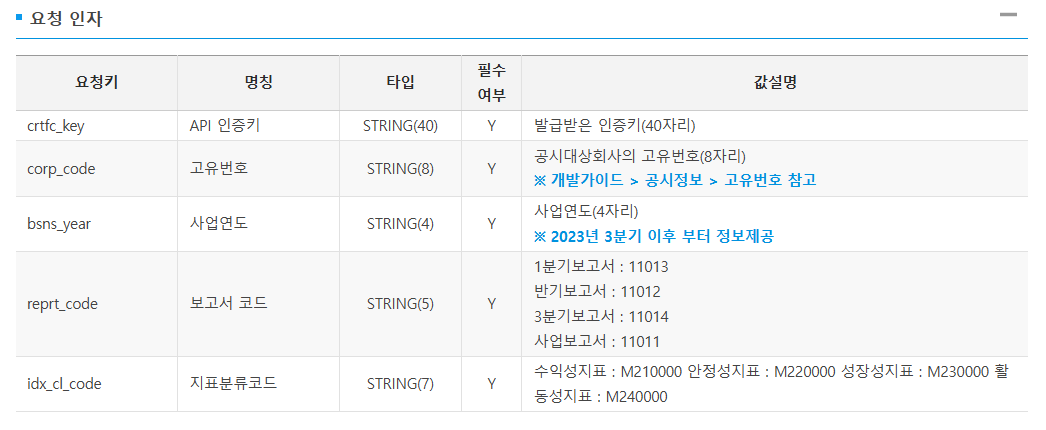
여기에 나와있는 정보를 보면, API를 활용하기 위해선 우선 API키를 발급받아야 하고, 받고자 하는 회사의 고유번호를 알아야 합니다.
(2) API키 발급
우선 API키는 이메일만 있다면 OpenDART의 인증키 신청 메뉴에서 쉽게 발급받을 수 있습니다. 만약 받고 싶은 데이터가 많다면, 신청할 때 여러 개의 이메일을 이용해 3~4개의 인증키를 받아두시는 것을 추천합니다.
전자공시 OPENDART 시스템 | 인증키 신청
opendart.fss.or.kr
인증키를 받으셨다면, 저희는 재무제표 공시대상 기업들의 고유번호 정보를 먼저 받고, 2023년도 사업보고서를 공시한 전체 기업들의 고유번호를 키값으로 하여 재무지표 데이터를 받아보겠습니다.
(3) jupyter notebook 실행
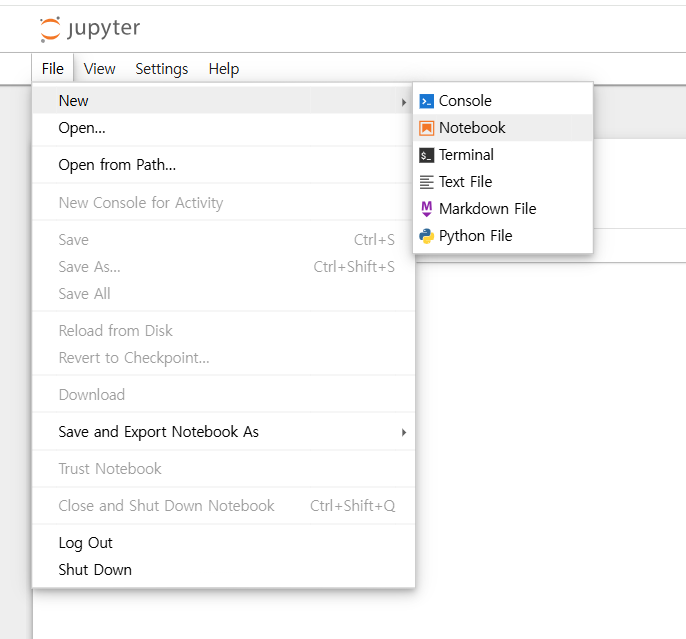
파이썬을 시작하기 위해 데이터를 추가로 다운받으려는 폴더에 가서, 폴더의 주소창에 jupyter notebook을 입력하면 주피터노트북이 실행됩니다. 만약 다른 파이썬 툴을 쓰신다면 해당 툴로 가시면 됩니다.

주피터노트북 홈이 열렸다면, 사진과 같이 파일 - new - notebook으로 들어가줍니다.
참고로, 처음에 열린 cmd창은 작업이 끝날 때 까지 닫으시면 안 됩니다!
(4) 기업 고유번호 수집
새 노트에 들어갔다면, 아래의 코드를 입력 후, shift+enter를 눌러줍니다.
| # -*- coding: utf-8 -*- # OpenDART 고유번호(corpCode.xml) 수집 → DataFrame 변환 import io import zipfile import requests import pandas as pd import xml.etree.ElementTree as ET def fetch_corp_codes(crtfc_key: str, save_zip_path: str | None = None) -> pd.DataFrame: """ corpCode.xml(Zip)을 다운로드하여 내부 XML을 파싱, 다음 컬럼으로 DataFrame 생성: - corp_code (8자리, 문자열) - corp_name - corp_eng_name - stock_code (상장사만 6자리, 비상장은 빈 문자열) - modify_date (YYYYMMDD, 문자열) Parameters ---------- crtfc_key : str OpenDART API 인증키(40자리). save_zip_path : str | None ZIP 원본을 로컬에 보관하고 싶으면 파일 경로 지정. Returns ------- pd.DataFrame """ url = "https://opendart.fss.or.kr/api/corpCode.xml" params = {"crtfc_key": crtfc_key} # 1) 요청 resp = requests.get(url, params=params, timeout=60) resp.raise_for_status() # 2) ZIP으로 열기 시도 content = resp.content try: zf = zipfile.ZipFile(io.BytesIO(content)) if save_zip_path: # 원본 보관(선택) with open(save_zip_path, "wb") as f: f.write(content) # 3) ZIP 안의 XML 파일 찾기 xml_names = [n for n in zf.namelist() if n.lower().endswith(".xml")] if not xml_names: raise RuntimeError("ZIP 안에서 XML 파일을 찾지 못했습니다.") xml_bytes = zf.read(xml_names[0]) # 4) XML 파싱 → list 노드 반복 root = ET.fromstring(xml_bytes) rows = [] for el in root.findall("list"): rows.append({ "corp_code": (el.findtext("corp_code") or "").strip().zfill(8), "corp_name": (el.findtext("corp_name") or "").strip(), "corp_eng_name": (el.findtext("corp_eng_name") or "").strip(), "stock_code": (el.findtext("stock_code") or "").strip().zfill(6) if (el.findtext("stock_code") or "").strip() else "", "modify_date": (el.findtext("modify_date") or "").strip(), # YYYYMMDD }) df = pd.DataFrame(rows) # 정렬 & 중복 제거(혹시 모를 중복 대비) if not df.empty: df = df.drop_duplicates(subset=["corp_code"]).sort_values("corp_code").reset_index(drop=True) return df except zipfile.BadZipFile: # ZIP이 아니면 (인증키 오류 등) XML 에러 응답일 가능성 → 메시지 추출 try: err_root = ET.fromstring(resp.text) status = err_root.findtext("status") message = err_root.findtext("message") raise RuntimeError(f"OpenDART 오류: status={status}, message={message}") except ET.ParseError: # XML도 아니면 원문을 그대로 노출 raise RuntimeError(f"응답을 해석할 수 없습니다. HTTP {resp.status_code}: {resp.text[:300]}") # ===== 사용 예시 ===== if __name__ == "__main__": CRTFC_KEY = "여기에 API 키 입력하세요." df_corp = fetch_corp_codes( CRTFC_KEY, save_zip_path=r"여기에 폴더주소 입력\corpCode.zip" ) df_corp.to_csv( r"여기에 폴더주소 다시 입력\corp_codes.csv", index=False, encoding="utf-8-sig" ) |
위의 코드에서 윗부분은 수정할 것이 없이 그대로 사용하시면 되고,
사용예시 아랫부분의 여기에~로 시작하는 부분들 알맞게 바꾸어 주시면 됩니다.
주의: CRTFC_KEY에는 발급받은 API키를, save_zip_path와 to_csv 경로에는 저장할 폴더 주소를 넣어주세요. (파일명은 바꾸지 않아도 됩니다.)
예시) C:\Users\LG\Desktop\블로그\API 이용\추가수집\2023\corpCode.zip
여기서 coprCode.zip과 corp_codes.csv는 파일명이므로 바꾸지 않으셔도 됩니다.
shift + enter 눌러서 주피터노트북 코드 실행시켜 주시면,
113419개의 회사 코드가 저장한 폴더에 생깁니다.
결과물 파일은 다음과 같습니다.
csv는 데이터 분석에 주로 쓰이는 텍스트 확장자입니다.
(5) 상장사 주요 재무지표 데이터 수집
다음으로, 저희가 얻은 회사의 고유번호와 종목코드를 이용해서 모든 상장기업의 수익성지표, 안정성지표, 성장성지표, 활동성지표 데이터를 받아보도록 하겠습니다.
코드는 정기보고서 주요정보 개발가이드 내용을 참고하여 작성하시면 되며, 아래에 예시 코드 적어두겠습니다. 필요한 부분이 있으면 수정하여 사용하셔도 무방하며, 필수값만 넣고 그대로 실행하셔도 작동합니다.
전자공시 OPENDART 시스템 | 개발가이드 | 상세
정기보고서 주요정보 개발가이드 정기보고서 주요정보 회계감사인의 명칭 및 감사의견 회계감사인의 명칭 및 감사의견 개발가이드 기본 정보 기본 정보 메서드 요청URL 인코딩 출력포멧 GET https
opendart.fss.or.kr
필수값(직접 넣어야 하는 부분):
1) BASE_DIR 부분에 폴더주소를 선택해서 지우고 그 자리에 corp_code를 다운받았던 폴더 주소를 입력해주세요.
2) 첫번째 API키 넣어주세요, 두번째 API키 넣어주세요 부분에 발급받은 API키 넣어주세요. 만약 API키가 하나라면 그냥 하나만 넣고 나머지는 지우셔도 됩니다.
3) 2023년 외의 다른 해의 정보를 보고싶으시다면, BSNS_YEAR 뒤의 "2023"을 다른 해로 수정해주시면 됩니다.
| # === DART A001 제출기업 선별(로컬 corpcode만 사용, 네트워크 다운로드 없음) + 지표 수집 : 완성 셀 === %pip install pandas requests tqdm openpyxl xlsxwriter import os, io, time, json, zipfile, pathlib, typing as t from datetime import datetime import xml.etree.ElementTree as ET import requests, pandas as pd from tqdm import tqdm # --------------------------- # 0) 사용자 설정 # --------------------------- BASE_DIR = r"폴더주소" # corp_codes.csv, corpcode.xml(또는 zip) 위치 INPUT_FILE = "corp_codes" # 확장자 없이 파일명(자동 탐색) API_KEYS = [ "첫번째 API키 넣어주세요", "두번째 API키 넣어주세요", ] BSNS_YEAR = "2023" # 사업연도 (예: "2023" → 공시연도 2024-03~06) REPRT_CODE = "11011" # 11011=사업보고서 IDX_CL_CODES = ["M210000", "M220000", "M230000", "M240000"] # 수익성/안정성/성장성/활동성 # 실행/안전 설정 DRY_RUN_N = None # 예: 200 → 상위 200개만 시험. 전체 실행은 None PAUSE_SEC = 0.06 # 호출 간 간격(020 방지) COOLDOWN_SEC_ON_020 = 8.0 # 020(요청한도 초과) 시 대기 MAX_RETRIES_PER_CALL = 4 CHECKPOINT_EVERY_BATCHES = 5 # 지표 수집: n배치마다 partial 저장 # 상장사만 포함(Y/K/N). 로컬 corpcode 없으면 필터 미적용. ALLOWED_CORP_CLS = {"Y","K","N"} # 제출기업 캐시(회사별 조회 결과) SUBMITTED_CACHE = "submitted_cache_{}_listed.csv".format(BSNS_YEAR) # BASE_DIR 아래 저장 # --------------------------- # 1) 고정값/유틸 # --------------------------- LIST_URL = "https://opendart.fss.or.kr/api/list.json" INDX_URL = "https://opendart.fss.or.kr/api/fnlttCmpnyIndx.json" def find_input_path(base_dir: str, stem: str) -> pathlib.Path: p = pathlib.Path(base_dir) for ext in (".xlsx", ".xls", ".csv"): c = p / f"{stem}{ext}" if c.exists(): return c direct = p / stem if direct.exists(): return direct raise FileNotFoundError("입력 파일을 찾을 수 없습니다: {}\\{}[.xlsx|.xls|.csv]".format(base_dir, stem)) def load_corp_codes(path: str) -> pd.Series: p = pathlib.Path(path) if p.suffix.lower() in [".xlsx", ".xls"]: df = pd.read_excel(p, dtype=str) elif p.suffix.lower() == ".csv": try: df = pd.read_csv(p, dtype=str, encoding="utf-8-sig") except UnicodeDecodeError: df = pd.read_csv(p, dtype=str, encoding="cp949") else: raise ValueError("지원 확장자: xlsx/xls/csv") first_col = df.columns[0] codes = (df[first_col].astype(str).str.strip() .str.replace(r"\D","",regex=True).str.zfill(8)) return codes[codes.str.len()==8].dropna().drop_duplicates() class KeyRotator: def __init__(self, keys: t.List[str]): if not keys: raise ValueError("API_KEYS가 비어 있습니다.") self.keys = [k.strip() for k in keys if k and isinstance(k, str)] self.idx = 0 def current(self) -> str: return self.keys[self.idx] def rotate(self): self.idx = (self.idx + 1) % len(self.keys) def call_json(url: str, params: dict, rot: KeyRotator) -> dict: """JSON 응답 API 호출(020 한도초과 대응/재시도 포함)""" backoff = 1.5 last_exc = None for _ in range(1, MAX_RETRIES_PER_CALL+1): params["crtfc_key"] = rot.current() try: r = requests.get(url, params=params, timeout=25) data = r.json() except Exception as e: last_exc = e time.sleep(backoff); backoff *= 1.6 continue st = data.get("status","") if st in ("000","013"): # 정상 또는 조회없음 return data if st == "020": # 한도 초과 → 키 로테이션 + 쿨다운 rot.rotate() time.sleep(COOLDOWN_SEC_ON_020) continue time.sleep(backoff); backoff *= 1.6 if last_exc: raise RuntimeError("API 호출 실패(예외): {}".format(last_exc)) raise RuntimeError("API 호출 실패(status={}, message={})".format(st, data.get('message'))) def chunked(seq, size): for i in range(0, len(seq), size): yield seq[i:i+size] # --------------------------- # 2) (로컬 전용) corpcode 로드: corpcode.xml / corpCode.xml / corpCode.zip만 사용 # --------------------------- def find_local_corpcode(base: str) -> t.Tuple[str, pathlib.Path]: base_p = pathlib.Path(base) # xml 우선 for name in ["corpcode.xml","corpCode.xml","CORPCODE.XML"]: p = base_p / name if p.exists(): return ("xml", p) # zip for name in ["corpcode.zip","corpCode.zip","CORPCODE.ZIP"]: p = base_p / name if p.exists(): return ("zip", p) return ("", pathlib.Path()) def parse_corpcode_xml_bytes(xml_bytes: bytes) -> pd.DataFrame: root = ET.fromstring(xml_bytes) rows = [] for el in root.iter("list"): corp_code = (el.findtext("corp_code") or "").strip().zfill(8) corp_name = (el.findtext("corp_name") or "").strip() stock_code = (el.findtext("stock_code") or "").strip() corp_cls = (el.findtext("corp_cls") or "").strip() # Y/K/N/E if corp_code: rows.append((corp_code, corp_name, stock_code, corp_cls)) return pd.DataFrame(rows, columns=["corp_code","corp_name","stock_code","corp_cls"]) def load_corp_master_from_local(base_dir: str) -> pd.DataFrame: ftype, path = find_local_corpcode(base_dir) if not ftype: print("[MASTER] 로컬 corpcode(xml/zip)을 찾지 못했습니다. 상장사 필터 없이 진행합니다.") return pd.DataFrame(columns=["corp_code","corp_name","stock_code","corp_cls"]) if ftype == "xml": xml_bytes = pathlib.Path(path).read_bytes() df = parse_corpcode_xml_bytes(xml_bytes) print("[MASTER] 로컬 XML 사용: {} ({} rows)".format(path, len(df))) return df # zip with zipfile.ZipFile(path, "r") as zf: inner = None for n in zf.namelist(): if n.lower().endswith(".xml"): inner = n; break if inner is None: raise RuntimeError("ZIP 내부에서 XML을 찾지 못했습니다: {}".format(path)) xml_bytes = zf.read(inner) df = parse_corpcode_xml_bytes(xml_bytes) print("[MASTER] 로컬 ZIP 사용: {} → {} ({} rows)".format(path, inner, len(df))) return df # --------------------------- # 3) A001 제출여부: 회사별 조회(전용) # --------------------------- def get_a001_submitted_by_corp(year: str, candidates: t.Set[str], api_keys: list, pause_sec=0.05, cache_path: t.Optional[str]=None) -> set: rot = KeyRotator(api_keys) y = int(year) + 1 windows = [(f"{y}0301", f"{y}0531"), (f"{y}0601", f"{y}0630")] found = set() # 캐시 복원 if cache_path: cache_abs = os.path.join(BASE_DIR, cache_path) if not os.path.isabs(cache_path) else cache_path if os.path.exists(cache_abs): try: old = pd.read_csv(cache_abs, dtype=str, encoding="utf-8-sig")["corp_code"].astype(str).str.zfill(8) found.update(old.tolist()) print("[CACHE] 제출기업 캐시 로드: {}개".format(len(found))) except Exception as e: print("[CACHE] 제출기업 캐시 로드 실패: {} (무시)".format(e)) cache_path = cache_abs cand_list = list(candidates) with tqdm(total=len(cand_list), desc="A001 회사별 확인", unit="corp") as pbar: for corp in cand_list: if corp in found: pbar.update(1); continue hit = False for (bgn_de, end_de) in windows: params = { "corp_code": corp, "bgn_de": bgn_de, "end_de": end_de, "pblntf_ty": "A", "pblntf_detail_ty": "A001", "last_reprt_at": "Y", "page_no": "1", "page_count": "10", } data = call_json(LIST_URL, params, rot) if data.get("status") == "000" and data.get("list"): found.add(corp); hit = True; break pbar.update(1) time.sleep(pause_sec) # 200개마다 캐시 저장 if cache_path and (pbar.n % 200 == 0): try: pd.Series(sorted(found), name="corp_code").to_csv(cache_path, index=False, encoding="utf-8-sig") except Exception as e: print("[CACHE] 제출기업 캐시 저장 실패(중간): {}".format(e)) # 최종 캐시 if cache_path: try: pd.Series(sorted(found), name="corp_code").to_csv(cache_path, index=False, encoding="utf-8-sig") print("[CACHE] 제출기업 캐시 저장: {} ({}개)".format(cache_path, len(found))) except Exception as e: print("[CACHE] 제출기업 캐시 저장 실패(최종): {}".format(e)) return found # --------------------------- # 4) 지표 수집 (100개씩 배치) # --------------------------- def collect_indices_for_category( codes: list, idx_cl_code: str, bsns_year: str, reprt_code: str, api_keys: list, base_dir: str, test_suffix: str, pause_sec=0.06 ) -> pd.DataFrame: rot = KeyRotator(api_keys) rows = [] batches = list(chunked(codes, 100)) partial_csv = os.path.join(base_dir, "indices_{}_{}_{}_long{}_partial.csv".format( bsns_year, reprt_code, idx_cl_code, test_suffix)) if not batches: return pd.DataFrame(columns=[ "reprt_code","bsns_year","corp_code","stock_code","stlm_dt", "idx_cl_code","idx_cl_nm","idx_code","idx_nm","idx_val" ]) with tqdm(total=len(batches), desc="{} 수집".format(idx_cl_code), unit="batch") as pbar: for bi, batch in enumerate(batches, start=1): params = { "bsns_year": bsns_year, "reprt_code": reprt_code, "idx_cl_code": idx_cl_code, "corp_code": ",".join(batch) } data = call_json(INDX_URL, params, rot) if data.get("status") == "000": rows.extend(data.get("list", [])) # 체크포인트 저장 if bi % CHECKPOINT_EVERY_BATCHES == 0 and rows: df_ckpt = pd.DataFrame(rows) if "idx_val" in df_ckpt.columns: df_ckpt["idx_val"] = pd.to_numeric(df_ckpt["idx_val"], errors="coerce") df_ckpt.to_csv(partial_csv, index=False, encoding="utf-8-sig") pbar.set_postfix({"rows": len(rows), "key": rot.idx}) pbar.update(1) time.sleep(pause_sec) if not rows: return pd.DataFrame(columns=[ "reprt_code","bsns_year","corp_code","stock_code","stlm_dt", "idx_cl_code","idx_cl_nm","idx_code","idx_nm","idx_val" ]) df = pd.DataFrame(rows) if "idx_val" in df.columns: df["idx_val"] = pd.to_numeric(df["idx_val"], errors="coerce") sort_cols = [c for c in ["corp_code","stock_code","idx_cl_code","idx_code"] if c in df.columns] return df.sort_values(sort_cols).reset_index(drop=True) # --------------------------- # 5) 파이프라인 실행 # --------------------------- def main(): ts = datetime.now().strftime("%Y%m%d_%H%M%S") test_suffix = "" if DRY_RUN_N is None else "_TEST{}".format(DRY_RUN_N) status_path = os.path.join(BASE_DIR, "indices_{}_{}_status{}.json".format(BSNS_YEAR, REPRT_CODE, test_suffix)) # (1) 내 파일에서 corp_code 로드 input_path = find_input_path(BASE_DIR, INPUT_FILE) codes_series = load_corp_codes(str(input_path)) my_codes_all = codes_series.tolist() print("[INFO] 내 파일({}) corp_code 로드: {:,}개".format(input_path.name, len(my_codes_all))) # (2) 로컬 corpcode 있으면 상장사 필터 적용 (Y/K/N + 보조규칙: stock_code 6자리 숫자) df_master = load_corp_master_from_local(BASE_DIR) if not df_master.empty: df_master["corp_code"] = df_master["corp_code"].astype(str).str.strip().str.zfill(8) df_master["corp_cls"] = df_master["corp_cls"].fillna("").astype(str).str.strip().str.upper() df_master["stock_code"] = df_master["stock_code"].fillna("").astype(str).str.strip() ALLOWED_CORP_CLS = {"Y","K","N"} is_listed = df_master["corp_cls"].isin(ALLOWED_CORP_CLS) | df_master["stock_code"].str.match(r"^\d{6}$") listed_codes = set(df_master.loc[is_listed, "corp_code"].tolist()) my_listed = sorted(set(my_codes_all) & listed_codes) print("[INFO] 상장사( Y/K/N 또는 6자리 종목코드 ) 교집합: {:,}개".format(len(my_listed))) else: my_listed = sorted(set(my_codes_all)) print("[INFO] 상장사 마스터 부재 → 전체 후보 사용: {:,}개".format(len(my_listed))) # (옵션) DRY RUN 제한 if DRY_RUN_N is not None: my_listed = my_listed[:DRY_RUN_N] print("[INFO] DRY RUN: 상위 {}개만 사용".format(DRY_RUN_N)) if not my_listed: print("[WARN] 대상 후보가 0개입니다. 입력/마스터를 확인하세요.") return # ← 반드시 main() 함수 내부 들여쓰기(4칸)여야 합니다. # (3) 회사별 조회로 A001 제출기업 선별 (캐시 사용) submitted_cache = os.path.join(BASE_DIR, SUBMITTED_CACHE) print("[STEP] 회사별 조회로 A001 제출기업 선별 중(후보: {:,}개)...".format(len(my_listed))) submitted = get_a001_submitted_by_corp( BSNS_YEAR, set(my_listed), API_KEYS, pause_sec=PAUSE_SEC, cache_path=submitted_cache ) print("[INFO] A001 제출 확인: {:,}개".format(len(submitted))) targets = sorted(submitted) if not targets: print("[WARN] 대상이 0개입니다. 연도/기간/파일을 확인해 주세요.") return # (4) 카테고리별 지표 수집 dfs_long = {} for cat in tqdm(IDX_CL_CODES, desc="카테고리 수집", unit="cat"): df_cat = collect_indices_for_category( targets, cat, BSNS_YEAR, REPRT_CODE, API_KEYS, BASE_DIR, test_suffix, pause_sec=PAUSE_SEC ) dfs_long[cat] = df_cat csv_path = os.path.join(BASE_DIR, "indices_{}_{}_{}_long{}.csv".format(BSNS_YEAR, REPRT_CODE, cat, test_suffix)) df_cat.to_csv(csv_path, index=False, encoding="utf-8-sig") print("[SAVE] {}: {} ({} rows)".format(cat, csv_path, len(df_cat))) with open(status_path, "w", encoding="utf-8") as f: json.dump({ "timestamp": datetime.now().isoformat(), "phase": "collecting_done", "category": cat, "rows": len(df_cat), "targets": len(targets) }, f, ensure_ascii=False, indent=2) # (5) 엑셀(LONG/WIDE) 저장 xlsx_long_path = os.path.join(BASE_DIR, "indices_{}_{}_LONG{}_{}.xlsx".format(BSNS_YEAR, REPRT_CODE, test_suffix, ts)) with pd.ExcelWriter(xlsx_long_path, engine="xlsxwriter") as writer: for cat, df_cat in dfs_long.items(): (df_cat if not df_cat.empty else pd.DataFrame(columns=["no_data"])) \ .to_excel(writer, sheet_name=cat, index=False) print("[SAVE] Excel (LONG): {}".format(xlsx_long_path)) xlsx_wide_path = os.path.join(BASE_DIR, "indices_{}_{}_WIDE{}_{}.xlsx".format(BSNS_YEAR, REPRT_CODE, test_suffix, ts)) with pd.ExcelWriter(xlsx_wide_path, engine="xlsxwriter") as writer: for cat, df_cat in dfs_long.items(): if df_cat.empty: pd.DataFrame(columns=["no_data"]).to_excel(writer, sheet_name=cat, index=False) continue idx_cols = [c for c in ["corp_code","stock_code"] if c in df_cat.columns] wide = df_cat.pivot_table(index=idx_cols, columns="idx_nm", values="idx_val", aggfunc="first").reset_index() wide.to_excel(writer, sheet_name=cat, index=False) print("[SAVE] Excel (WIDE): {}".format(xlsx_wide_path)) with open(status_path, "w", encoding="utf-8") as f: json.dump({"timestamp": datetime.now().isoformat(), "phase": "all_done", "targets": len(targets)}, f, ensure_ascii=False, indent=2) print("[DONE] 모든 작업이 완료되었습니다.") # 실행 main() |
위 코드 실행하고 나시면, corp_code가 있던 폴더에 아래와 같은 파일이 생성됩니다.

내용을 보시면, 아래와 같이 2023년도 상장사들의 재무지표를 확인할 수 있습니다.

필요하신 분이 있으실 수 있으니, 2023년 상장사 수익성지표, 활동성지표, 안정성지표, 성장성지표 파일 첨부합니다.
나중에 DART가 아닌 다른 곳에서 API를 이용하실 때도 같은 방식으로 하시면 됩니다.
1. API키 발급받기
2. 개발가이드를 통해 필요한 입력값 확인, 준비하기
3. ChatGPT 등 이용하는 생성형AI에게 코드 작성해달라고 하기
4. 주피터노트북에 해당 코드 붙여넣고 실행하기
여기까지 하면, 데이터분석을 위한 준비는 끝났습니다.
다음 글에서는 데이터분석에서 가장 중요한, 전처리와 EDA (데이터 클리닝, 결측치 처리, 이상치 판단, 요약통계 확인 등)에 대해 살펴보겠습니다.
데이터 분석 기초(4) 재무지표 빅데이터 전처리 (with python)
안녕하세요. 데이터CPA, cloud입니다. 지난 글에서는 OpenDART의 API를 활용해서 상장기업 전체의 재무지표 데이터를 수집해보았습니다. 데이터 분석 기초(3) API를 활용한 재무데이터 수집(OpenDART API)
datacpa.tistory.com
'AI & Data analystics > Data' 카테고리의 다른 글
| 서울시 공영주차장 실시간 현황 지도 만들기 | 데이터 분석 기초(6) (1) | 2025.09.08 |
|---|---|
| EDA와 데이터 전처리, 무엇이 다를까? | 데이터 분석 기초(5) (2) | 2025.09.05 |
| 재무지표 빅데이터 전처리 (with python) | 데이터 분석 기초(4) (3) | 2025.09.03 |
| openDART에서 데이터 수집하기(feat.XBRL) | 데이터 분석 기초(2) (4) | 2025.09.01 |
| 아나콘다 & 주피터 노트북(Jupyter Notebook) 설치 및 설정 | 데이터 분석 기초(1) (3) | 2025.08.24 |


